


AI agent tool use is what turns a language model from a chatbot into a worker. A model on its own can only produce text; it cannot check an order, query a database, or send a message. Tool use lets it do those things: the model emits a structured call naming a tool and its arguments, your application executes the call against a real system, and the result comes back as new context. This article explains how that works, from the JSON schema that describes a tool to the full request trace of a two-tool task, and where it breaks in practice.
What AI agent tool use actually means
A tool is any external capability the model can invoke: a function in your code, an API endpoint, a database query, a search engine. When the model needs something outside its own text, it does not write a sentence about it. It produces a structured function call — a name and a set of arguments — and your application does the rest.
Every tool interaction has three parts. First, the description: your application tells the model what tools exist and what each one does. Second, the invocation: the model returns a tool call instead of plain text. Third, the result: your application runs the tool and sends the output back, and the model reasons about it and either calls another tool or answers. The model never executes anything itself: it only ever produces text; your code touches the outside world.
How an agent decides to call a tool
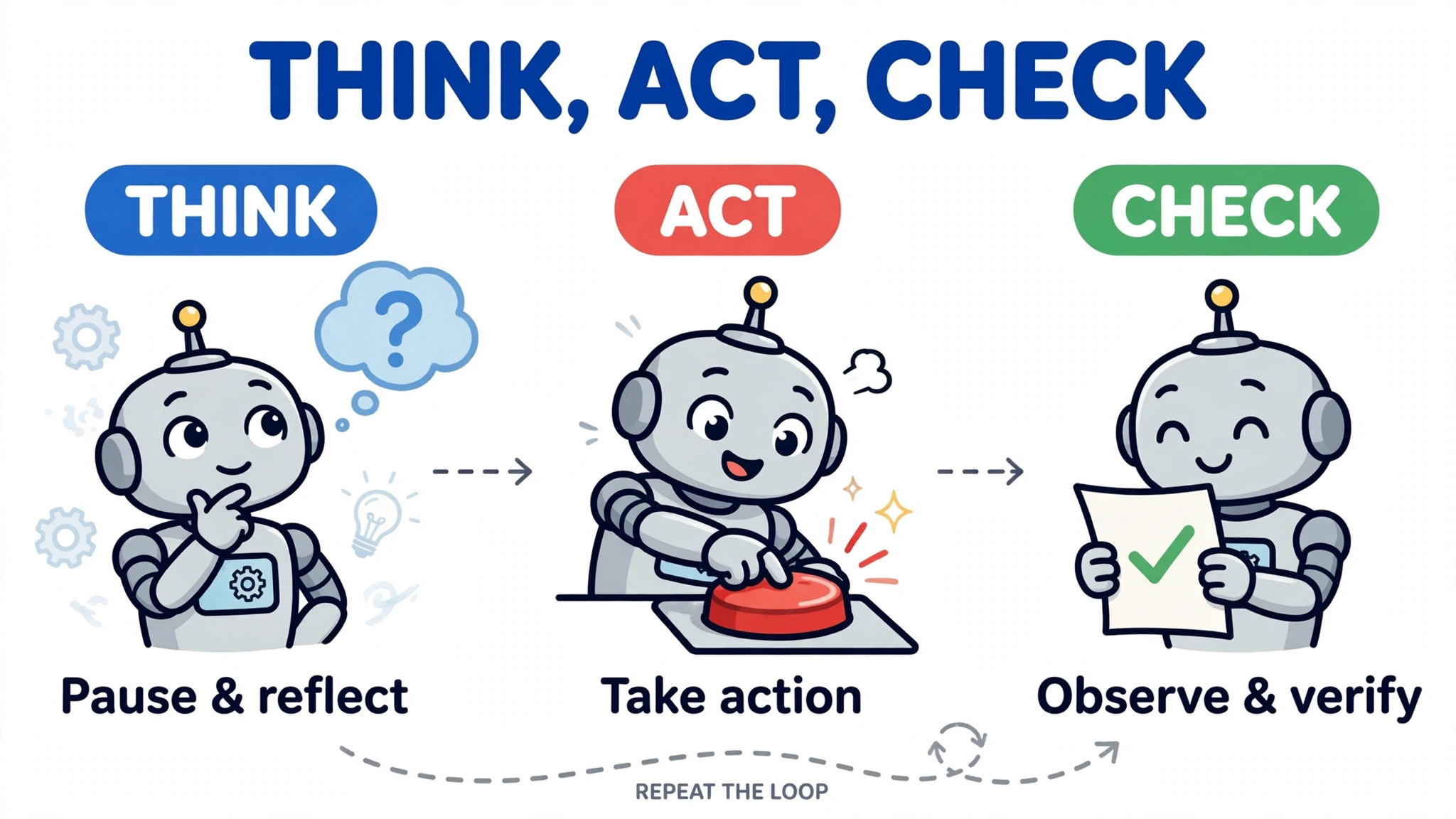
ReAct, short for reasoning and acting, is a pattern for this loop, introduced in the 2022 paper “ReAct: Synergizing Reasoning and Acting in Language Models” by Yao and colleagues, later presented at ICLR 2023: the model thinks about what to do next, acts by calling a tool, reads the observation the tool returns, and thinks again — thought, action, observation, until it has enough to answer.
Interleaving reasoning and acting beats doing either alone. On HotpotQA and FEVER, letting the model pull facts from a Wikipedia API mid-reasoning reduced the hallucination and error propagation of pure chain-of-thought. On interactive benchmarks the gains were large: 34 percentage points on ALFWorld and 10 points on WebShop. Combining ReAct with chain-of-thought performed best overall.
Inside the loop, the model chooses tools from their descriptions alone, and decides when not to call anything: if the question is answerable from the conversation, it answers directly. Benchmarks measure that judgement: the Berkeley Function Calling Leaderboard tests relevance detection — knowing when to refuse a tool call — alongside simple, parallel, and multi-turn calls. Getting it wrong either way is a failure: an unneeded call wastes time and money, and answering from memory when a lookup was needed produces a confident error.
Function calling: how tools are described to the model
Function calling is the mechanism OpenAI’s API and Anthropic’s Claude provide for giving a model tools. In the Chat Completions API, you describe each function with a tool object: a type (always function) and a nested function object holding the name, a description of when and how to use it, a parameters schema, and an optional strict flag. Here is the definition for a tool that looks up an order:
{
  "type": "function",
  "function": {
    "name": "get_order_status",
    "description": "Look up the status of a customer order by its order ID. Use this when the customer asks where their order is.",
    "parameters": {
      "type": "object",
      "properties": {
        "order_id": {
          "type": "string",
          "description": "The order ID, for example ORD-12345"
        }
      },
      "required": ["order_id"],
      "additionalProperties": false
    },
    "strict": true
  }
}
The description is doing real work: it is the model’s only evidence about what the tool does, so its quality decides whether it picks the right tool with the right arguments. In one test of 500 queries against 10 tools, a vague description such as “Search for info” produced 41% tool-selection accuracy, while a specific description with examples and anti-examples produced 94%. Write descriptions as if instructing a careful colleague: when to use the tool, what each parameter means, what the output contains.
Two practical constraints follow from how definitions are delivered. Function definitions are injected into the model’s context on every request, so they count against the context limit and are billed as input tokens. And accuracy falls as the tool list grows: OpenAI’s documentation recommends fewer than 20 functions at the start of a turn, deferring rarely used tools with tool search.
From model output to a real API call
OpenAI’s documentation describes tool calling as a five-step conversation: request with the tools, receive a tool call, execute code on the application side, send a second request with the tool output, and receive a final response — or more tool calls.
When the model wants to use a tool, it returns a structured tool_calls array instead of a text answer, each entry carrying a unique id, the function name, and the arguments as a JSON string:
{
  "tool_calls": [{
    "id": "call_abc123",
    "type": "function",
    "function": {
      "name": "get_order_status",
      "arguments": "{\"order_id\": \"ORD-12345\"}"
    }
  }]
}
The arguments arrive as a JSON string, not an object: your code must parse them before use. Your application then executes the call — validating the arguments, running your code or issuing the HTTP request, and attaching whatever credentials the external system needs. Credentials live in your application, not in the prompt; the model passes an order ID, and your code attaches the API key. The result, an error, or a timeout returns as a tool message paired to the original call by its id, and the model reasons about it before its next step. In Anthropic’s Claude, the same exchange uses tool_use blocks and tool_result messages, with an MCP host executing the call through session.call_tool(name, input).
MCP and the standard ways tools reach an agent
Three standard patterns get tools to a model. The first is native function calling, built into each provider’s API: register tool definitions with the request, and the model returns structured calls. The second is the Model Context Protocol (MCP), an open-source standard for connecting AI applications to external systems. The third is direct HTTP calls: your code wraps an API in a plain function, and the model never sees the HTTP at all.
MCP is best understood through its own description: “Think of MCP like a USB-C port for AI applications. Just as USB-C provides a standardized way to connect electronic devices, MCP provides a standardized way to connect AI applications to external systems.” An MCP server exposes three primitives: Tools (model-callable functions), Resources (addressable read-only data), and Prompts (server-defined templates). Transport is stdio for local servers or streamable HTTP for remote ones, with optional OAuth 2.1; the 2025-03-26 revision deprecated the older HTTP+SSE transport.
The practical difference is reuse. Function calling is a model feature inside one application: stateless, per-application, quick to set up. MCP is a shared protocol: one server serves any client that speaks it, tools can be updated at runtime without redeploying the application, and the same server can feed Claude, ChatGPT, Visual Studio Code, Cursor, and GitHub Copilot. Choose native function calling for a prototype or a handful of tools in one application; MCP when the same tools must serve several applications, or the tool set is large and changes often; a direct HTTP wrapper for a single well-understood API where no standard buys you anything.
A worked end-to-end example
Take a customer-support agent with two tools: get_order_status, which looks up an order, and issue_refund, which refunds an eligible order. The customer asks: “Where is my order ORD-12345, and can I get a refund?” The second call depends on the first: the code only issues a refund after get_order_status has confirmed the order is eligible — which makes this a real multi-step task, not two independent lookups.
The full loop, using the OpenAI Chat Completions API, looks like this. The local functions stand in for real order-system calls; in production they would query your database and payment provider.
import json
from openai import OpenAI

client = OpenAI()

tools = [
    {
        "type": "function",
        "function": {
            "name": "get_order_status",
            "description": "Look up the status of a customer order by its order ID.",
            "parameters": {
                "type": "object",
                "properties": {
                    "order_id": {"type": "string", "description": "The order ID, for example ORD-12345"}
                },
                "required": ["order_id"],
                "additionalProperties": False,
            },
            "strict": True,
        },
    },
    {
        "type": "function",
        "function": {
            "name": "issue_refund",
            "description": "Issue a refund for an order that is eligible for one. Only call this after get_order_status confirms the order is refund-eligible.",
            "parameters": {
                "type": "object",
                "properties": {
                    "order_id": {"type": "string", "description": "The order ID to refund"},
                    "reason": {"type": "string", "description": "Why the refund is being issued"},
                },
                "required": ["order_id", "reason"],
                "additionalProperties": False,
            },
            "strict": True,
        },
    },
]


confirmed_eligible = set()


def get_order_status(order_id):
    # In production: query the order system.
    result = {
        "order_id": order_id,
        "status": "delivered",
        "delivered_on": "2026-10-20",
        "refund_eligible": True,
    }
    if result["refund_eligible"]:
        confirmed_eligible.add(order_id)
    return result


def issue_refund(order_id, reason):
    # The code enforces the prerequisite: a refund is only issued for an
    # order whose eligibility get_order_status has already confirmed.
    if order_id not in confirmed_eligible:
        return {"error": "refund refused: call get_order_status first to confirm eligibility"}
    # In production: call the payment provider.
    return {
        "order_id": order_id,
        "refund_id": "ref_98765",
        "amount": 49.99,
        "currency": "USD",
        "status": "processed",
    }


available = {"get_order_status": get_order_status, "issue_refund": issue_refund}

messages = [
    {"role": "user", "content": "Where is my order ORD-12345, and can I get a refund?"}
]

for _ in range(5):  # cap the loop: never let the agent call tools forever
    response = client.chat.completions.create(
        model="gpt-4o",
        messages=messages,
        tools=tools,
    )
    message = response.choices[0].message
    if not message.tool_calls:
        print(message.content)
        break
    messages.append(message)
    for call in message.tool_calls:
        args = json.loads(call.function.arguments)
        result = available[call.function.name](**args)
        messages.append(
            {
                "role": "tool",
                "tool_call_id": call.id,
                "content": json.dumps(result),
            }
        )
The trace runs in three model turns. First, the model returns a tool call for get_order_status:
{"order_id": "ORD-12345"}Your code runs it and appends the result:
{"order_id": "ORD-12345", "status": "delivered", "delivered_on": "2026-10-20", "refund_eligible": true}Second, the model reasons over that result — delivered, and eligible — and calls issue_refund:
{"order_id": "ORD-12345", "reason": "customer requested refund for delivered order"}Your code runs it and appends the result:
{"order_id": "ORD-12345", "refund_id": "ref_98765", "amount": 49.99, "currency": "USD", "status": "processed"}Third, the model answers: the order was delivered on 20 October and a refund of $49.99 has been processed. This trace shows the successful path: had the model called issue_refund first, the code would have returned an error instead of a processed refund, because the description asks the model to wait but only the code enforces the order. Every tool call in that trace is another model round-trip: a two-tool task costs three model calls, with tool schemas billed as input tokens on every request. Each step is a place the task can fail: a wrong argument in step one, a refused refund in step two, a misread result in step three.
Common failure modes and limits

The first failure is the model calling the wrong tool, or the right tool with the wrong arguments. The Berkeley Function Calling Leaderboard (BFCL), run by UC Berkeley’s Sky Computing Lab, tests models on over 2,000 question-function-answer pairs across simple, parallel, multiple, relevance-detection, and multi-turn calls, scored by abstract syntax tree comparison. In its 2025 Q1 snapshot, Claude 3.5 Sonnet led at 90.2% overall accuracy, GPT-4o scored 88.5%, and Llama 3.1 70B scored 68.4%. Multi-turn scores run 5–10 points below single-turn scores for every model — and multi-turn is the category closest to real agent work, so the accuracy that matters for a task like the refund example is lower than the headline.
The second failure is the world pushing back: authentication failures, rate limits, flaky services. A call that worked yesterday can fail today because a credential expired or an API changed, and the model must decide: retry, try another tool, or tell the user.
The third failure is a runaway loop: an agent that keeps calling tools without making progress — re-checking the same order, retrying the same failing call — burns tokens and time until something stops it. That is why the example script caps the loop at five iterations — a hard iteration limit is the simplest guard.
The fourth failure is security, and it is the most consequential. Tool results are data, but the model reads them as text in the same context window as its instructions, and it cannot reliably tell the two apart. In an indirect prompt injection, malicious instructions hidden in data the agent reads — a web page, a support ticket, a product review — tell the model to do something the user never asked for, such as listing customer emails. Cloud Security Alliance research from September 2026 found indirect prompt injection reliably defeated the safety classifier of a production AI coding agent, with attack success rates of 60–80% reported against Claude Code Auto Mode. A related variant, tool poisoning, hides the injection in a tool description. The defences are structural: least privilege for every tool, strict argument validation, human approval before destructive actions, and treating retrieved content as untrusted.
The final limit is cost and latency. Every tool round-trip is another model call, tool schemas add several hundred tokens of prefill to every request, and the short JSON output is fast to generate but still billed. The cost grows with every call, so a small tool list is also a cost control.
Choosing tools and APIs for your own agent
Start from the job, not the catalogue: list the actions the agent must perform — look up an order, refund it, file a ticket — and give it one tool per action. A tool that tries to do everything is harder for the model to use well; small, single-purpose tools with precise descriptions reduce the chance of a wrong call.
Prefer standard interfaces over bespoke wrappers. If a system already exposes a well-documented REST API, wrap it in a thin function. If the same tools must serve several applications, put them behind an MCP server once. Keep the surface small: fewer than 20 functions at the start of a turn, deferring the rest, and validate every argument server-side before executing anything. A strict schema and a good description address different parts of correctness — the schema constrains the arguments the model can produce, the description guides which tool it chooses — so use both rather than relying on either alone.
Finally, log every call while you develop: the trace of tool calls and results is a useful record of what the agent actually did, and what you will reach for when a task first fails in production.